Author name: Ebenezer

AI and Robotics Lab

Tech Tinkerer Program: ICT, Coding, AI & Robotics for ICSE Students

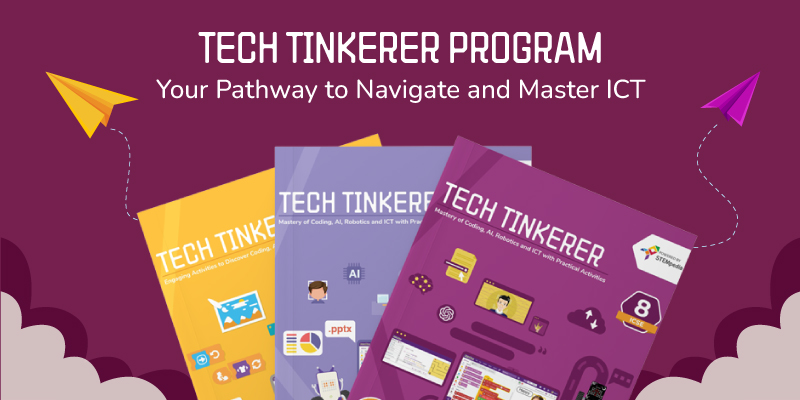
The world is evolving at the speed of light, with technology leading the way. Students need more than theoretical knowledge to thrive in this fast-paced environment. They need practical skills, like our ICT, Coding, AI, and Robotics for ICSE students, that inspire innovation and curiosity. Information and Communication Technology (ICT) is the foundation of modern education, and the Tech Tinkerer Program harnesses its potential to transform learning for ICSE students from Classes 1 to 8. Rooted in NEP 2020 and NCF 2023 principles, this program integrates key areas of ICT, artificial intelligence (AI), coding, and robotics into the ICSE curriculum. The modern approach to education embraces ICT, AI, and robotics, transforming traditional learning spaces into vibrant innovation hubs. Empowering Students with 21st-Century Skills: ICT, AI, Coding and Robotics for ICSE Students The traditional classroom, with its outdated and theoretical approach, is becoming less relevant in today’s fast-paced, tech-driven world. Studies reveal that nearly 40% of the current curriculum taught to students from classes 8 to 12 is outdated—highlighting an urgent need for reform. AI and Robotics to Power Big CISCE Reform is an exciting initiative to bridge this gap by reshaping how students learn and innovate. With the Fourth Industrial Revolution rapidly unfolding, the need for a hands-on, dynamic approach to learning is more important than ever. Tech Tinkerer blends traditional ICT education with future-ready skills, providing students with engaging, interactive experiences that make learning technology exciting and practical. By fostering creativity, critical thinking, and problem-solving, the program equips students with the essential 21st-century skills they need to excel in tomorrow’s tech-driven world. Tech Tinkerer Program: Equipping Students with 21st-Century Skills The Tech Tinkerer Program is an innovative initiative to empower ICSE students (Classes 1 to 8) with essential 21st-century skills in ICT, AI, Coding, and Robotics. Aligned with NEP 2020 principles, this program transforms traditional learning into a hands-on, immersive experience that nurtures creativity, problem-solving, and future-ready thinking. The program blends advanced technologies with interactive learning methodologies, ensuring students learn and innovate. Activity-Based Learning Modules The curriculum is built around activity-based learning, ensuring students are actively involved in their education. Each concept is introduced through fun and interactive activities that make learning engaging and memorable. Activity-Based Learning helps students develop critical thinking and collaborative skills while building practical knowledge. Curriculum Aligned with ICT, Coding, AI and Robotics for ICSE Students The Tech Tinkerer curriculum is designed to provide ICSE students with a well-rounded foundation in ICT, AI, Coding, and Robotics. It integrates various essential skills such as basic painting, graphics, and computational thinking. It eliminates the need for additional textbooks as it covers everything required for a modern, tech-savvy education. The program ensures that students learn essential skills step-by-step, from basic concepts to advanced applications. AI-based Platform – PictoBlox PictoBlox is an easy-to-use platform that integrates block-based coding and Python programming. Through PictoBlox, students build strong foundations in computational thinking, coding logic, and robotics. It plays an important role in ICSE students’ understanding of ICT, AI, coding, and robotics courses. Beginner-Friendly: Students start with simple projects like creating apps or designing websites. Progressive Learning: As they gain confidence, they move on to more complex tasks like automating processes and developing AI-based solutions. Engage and Innovate with Quarky Robotic Kit A key highlight of the program is the Quarky Robot, a versatile and engaging tool designed for interactive learning. With Quarky, students can: Build and program robots using intuitive coding interfaces. Explore and apply STEM concepts in real-world scenarios. Create industry-standard projects that develop engineering and problem-solving skills. Learning Management System (LMS) The Tech Tinkerer Program includes an LMS platform ensuring seamless learning and tracking progress. Teachers can access comprehensive teaching resources like session plans, lecture slides, and multimedia content. Students benefit from guided learning paths, quizzes, and assignments, ensuring consistent engagement and knowledge reinforcement. AI and Robotics Lab: A New Era of Learning with ICT, Coding, AI and Robotics for ICSE Students To make learning highly immersive, the program offers access to AI and Robotics Labs equipped with cutting-edge tools and resources. Over 500+ labs have been established across schools in India, making advanced technology education accessible to students. These labs provide a practical learning environment where students can experiment with robotics kits, AI models, and coding exercises. Labs are designed for activity-based learning, where students learn by doing—enhancing their creativity and analytical skills. A Global Stage: Codeavour Competition The learning doesn’t stop in the classroom. Students in the Tech Tinkerer program can also participate in Codeavour, an international competition that showcases the best of AI, robotics, and coding. Aligned with the UN’s Sustainable Development Goals, Codeavour is the world’s largest competition. Through Codeavour, students can collaborate, innovate, and compete globally—solving real-world problems and making a tangible impact. Teacher Training Program on ICT, AI, Coding and Robotics for ICSE  Teachers must receive comprehensive resources and training to effectively deliver 21st-century skills in the classroom. Our Tech Tinkerer Program equips ICSE students with essential skills in ICT, AI, Coding, and Robotics. Training on AI, Coding, Python, and Robotics: Teachers will gain in-depth expertise in AI, Python, and Robotics education, aligned with major curricula (CBSE, ICSE, IB, Cambridge, NEP 2020). Learn practical, hands-on methods to integrate these technologies into lessons. Comprehensive Teaching Resources: Teachers will receive a Teacher’s Guide for integrating AI, ML, and Python into their lessons, lesson plans, activity sheets, and a question bank, reducing preparation time and enhancing learning outcomes. Innovative Teaching Methods: The program includes hands-on and practical exercises, empowering teachers to confidently teach 21st-century skills like problem-solving, critical thinking, and coding. Global Certification: STEMpedia will recognize teachers who complete the program with a certification acknowledging their expertise in teaching AI, Python, and Robotics. In a Nutshell! As the world accelerates into the future, the need for practical, innovative learning has never been more critical. The Tech Tinkerer Program is a beacon of change designed to teach technology engagingly. As Albert Einstein once said, “Education is not the learning of facts, but the training of the mind to think.” With Tech Tinkerer’s hands-on approach, students are not just absorbing information but learning how to think, innovate, and create the future with AI,
AI and Robotics Lab

How to Set Up an Advanced Robotics Lab in School

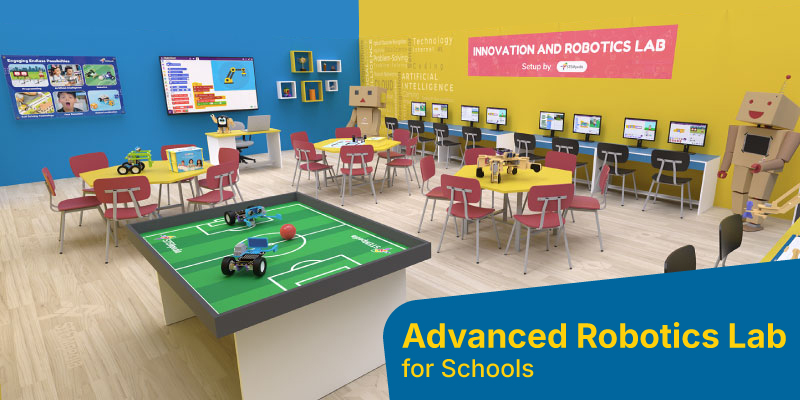
Setting up an advanced robotics lab in a school is an exciting opportunity to introduce students to science, technology, engineering, and innovation. The Robotics lab provide hands-on learning experiences, encourages teamwork, and helps students develop essential skills like coding, AI, robotics, and computational thinking. These skills are fun and give students a competitive edge for future careers. According to a report by the World Economic Forum, 65% of students entering primary school today will work in jobs that don’t yet exist—many of which will be driven by robotics and automation. With this data in mind, it’s clear that schools should start teaching AI and robotics from an early age. Setting up an advanced robotics lab can help bridge the gap, providing students with the tools and knowledge they need to excel in a rapidly evolving world. Here is a guide to setting up an advanced Robotics lab layout with professional guidance. Steps to Set Up an Advanced Robotics Lab in Schools As your school plans to set up a robotics lab, you’ll need a few essential things to start. From choosing the right space and equipment to selecting the proper curriculum and kits, here are five key steps to help you set up an advanced robotics lab for the school: Step 1: Infrastructure Requirements The first and most important step in setting up a robotics lab is having a dedicated space where students can explore AI and robotics concepts. There are two possible scenarios: If the school already has space – In this case, you can transform the existing area into a well-designed, engaging environment that encourages students to learn and experiment with AI and robotics. If the school lacks space – Some schools may not have a designated area for a robotics lab. Creating a new setup requires careful planning to ensure a functional and inspiring learning space. No matter the situation, STEMpedia, an AI and Robotics set up company, provides a complete guide on designing an ideal AI lab, ensuring that it meets all requirements. Essential Infrastructure for Setting up an Advanced Robotics Lab  The lab’s infrastructure should be a valuable asset to the school, providing both functionality and an engaging learning atmosphere. Here’s what an ideal robotics lab should include: Spacious Worktables—Large, hexagonal tables where groups of students can comfortably collaborate and work on activities. Practice Area—A designated space (such as a practice field) where students can test and refine their robotic projects. Essential Tools and Equipment—A well-stocked lab with the necessary tools, robotic kits, and computers. Decorative Elements—Frames, posters, and wall art that enhance the AI and robotics vibe, making the lab visually appealing and interactive. A well-planned robotics lab should have enough space to accommodate workbenches, computers, and storage while allowing free movement for students. Since robotics projects often require larger setups, having an open, well-organized area is crucial. Step 2: Structured Curriculum for Advanced Robotics Lab  After you’ve solved the question of space for the robotics lab, the next big question is: What will students study? What curriculum should you follow in school for robotics? The answer lies in choosing an AI and Robotics curriculum that aligns with your school’s board. Integrating robotics into the curriculum is key to preparing students for the future. Ensuring your program follows the right guidelines can help students develop important coding, AI, and robotics skills. CBSE Aligned Curriculum for ICT, Coding, AI, and Robotics Ensure that your AI and robotics program aligns with the relevant subject codes, such as 417, which focus on coding, AI, and STEM education. Utilize resources like ICT, Coding, and AI books for classes 1-8 and 9-10 to provide structured, engaging learning experiences. ICSE Aligned Curriculum for ICT, Coding, AI, and Robotics Align your curriculum with subject code 66, which covers robotics and AI. Books on ICT, Coding, and AI for classes 1-8 and 9-10 provide hands-on learning and practical exposure to these essential subjects. AI and Robotics Curriculum for Different Boards Customize your robotics program to meet your board’s specific academic requirements. Select AI and Robotics books that align with your school’s curriculum guidelines. Step 3: DIY Robotics Kit for Advanced Robotics Lab Set Up in School After aligning the curriculum, the next step is deciding on the heart of the robotics lab: DIY Robotics kits. These robotics lab equipment for school are essential for giving students the hands-on experience they need to learn and grow in the field of robotics. Choosing the right tools to engage students and help them explore their creativity is crucial for a successful robotics lab. This is where Quarky, our DIY Robotics Kit, comes in. Designed specifically for advanced robotics labs, Quarky provides all the necessary hardware components for students to dive into the exciting world of robotics. Students can start with simple tasks like building robots that follow lines and gradually progress to more complex projects, such as Humanoid Robots that mimic human movements or four-legged robots that can walk and navigate. Students can explore advanced robotics concepts with exciting kits like the Quarky Mars Rover, inspired by NASA’s Perseverance, and the Mecanum Wheel Robot for multi-directional movement. They can dive into manipulator robotics with the 3 Degree of Freedom Robotic Arm Kit or unleash their creativity with the Quarky Quadruped Kit, coding it to walk, dance, and follow gesture commands. As they advance, students can even experiment with creating Internet of Things (IoT) devices that connect to the Internet. Step 4: Integrating a Coding and AI Platform in the Classroom After deciding on the robotics kit, the next important step is choosing the right coding software for classes to customize how your robots work. This is where a coding and AI platform comes in – it’s the backbone of any robotics lab, allowing students to bring their ideas to life. Pictoblox is a user-friendly, AI-based platform that makes learning coding and AI concepts easy for students in the robotics lab. It helps turn abstract ideas into real-world applications. Here’s how it works: Simplified Coding: Pictoblox supports block-based coding, which is perfect for beginners. It also offers Python for more advanced learners, allowing everyone to learn at their own

AI and Robotics Lab

How to Start a Robotics Club in School

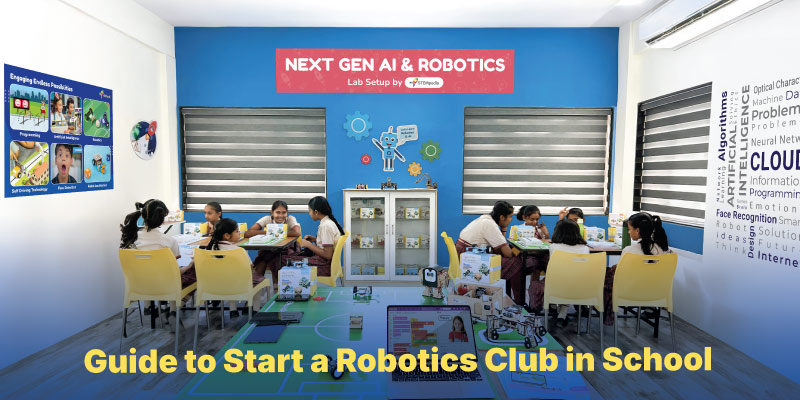
Starting a robotics club in school is often a bold and welcomed move as far as taking initiative is concerned. It fosters creativity, problem-solving, and STEM skills in students. But to turn it into a hub for innovation and learning, the right planning and resources play an important role for inviting robotics in classrooms. Incorporating a robotics club in school also addresses the STEM skills gap. This ensures that the education system is producing graduates with the skills required by the job market (Ayeni et al., 2024) Here’s a step-by-step guide to help you establish a successful school robotics club. Step 1: Get School Approval And Gather Support Before diving into robotics, you’ll need to get approval from your school administration. Prepare a proposal outlining the club’s objectives, benefits, and alignment with STEM education goals. Highlight how robotics clubs in school enhance problem-solving skills, teamwork, and coding knowledge. Additionally, gather support from teachers, staff, and parents who can help with club logistics and mentoring. A strong support network increases the chances of success. A well-prepared proposal increases the chances of getting school approval and building a strong support network. You can refer to a template here. Step 2: Define the Club’s Structure And Schedule Once you get approval, establish a clear structure for the club. Now, you must decide on: The meeting frequencies of your club- weekly, bi-weekly, or monthly. Duration of sessions- 30 minutes, 1 hour, etc. The club can be for all grade levels. Goals, such as introducing coding, building a robot, or preparing for competitions like Codeavour International, an annual AI, coding, and robotics competition hosted by STEMpedia. A clear structure ensures consistency and makes it easier to manage the club effectively. and also bring like-minded people together. Step 3: Secure Funding And  Resources To sustain a robotics club in school, explore different funding options: 1.  School budget allocations: Talk to a teacher or School Admin Ask if your school has any budget for student clubs Present your idea to the principal or a teacher who supports STEM activities 2. Grants and sponsorships: Some companies and organizations give money (grants) to schools for STEM education. Research local businesses or tech companies that might want to support your club. Ask your school if they can help you apply for these grants. 3. Fundraising events and donations: Plan a bake sale, school fair, or raffle to raise money Create a crowdfunding campaign on platforms like GoFundMe with the help of teachers or parents. Talk to parents, alumni or local businesses to see if they can donate funds or old robotics kits Keep track of all the money collected and spend it wisely on robots, coding tools, and competition fees. Step 4: Choose the Right Robotics Tools And Kits  When choosing the right robotics kits for classrooms, age and skill level are key factors to consider. That’s where Wizbot comes in. Designed for 4- to 10-year-olds, it teaches basic programming concepts through hands-on, button-based coding. No screens required. That makes it perfect for developing algorithmic thinking from the ground up. Quarky is geared towards students aged 7 and up. With it, they can get hands-on experience in AI, robotics and IoT. They can build and program real-world robots, and see the results for themselves. PictoBlox works with both Quarky and Wizbot. This powerful AI-based coding platform supports both block-based and Python coding. That means students can use it to program Quarky for AI-driven projects or Wizbot for movement-based coding activities. And that opens up a whole lot of learning possibilities. Ensure the kits are age-appropriate, budget-friendly, and align with your club’s learning objectives. Also, decide if the activities will be screen-based or screen-free. The right robotics tools will set the foundation for engaging and progressive learning. Reach out to edtech companies like STEMpedia to ask for discounts on robotics kits like Quarky and Wizbot.  Step 5: Plan Engaging Activities And Curriculum Keeping students engaged with robotics in classroom requires an exciting curriculum. You can start with: 1. Simple hands-on activities such as: Basic Robotics and Coding Introduction: Use Wizbot for younger students to teach movement-based coding through button commands. Build a Simple Robot: Have students assemble a basic robot using Quarky and program it with PictoBlox to perform simple tasks. AI and Machine Learning Projects: Use PictoBlox to introduce AI-based projects, such as facial recognition or speech-based commands. 2. Problem-solving challenges and real-world applications. 3. Progressing to AI, automation, and IoT projects. 4. Using guided resources from STEMpedia’s curriculum books, online courses integrated in a fun way, etc. The goal is to make learning fun and interactive while developing crucial STEM skills. An engaging  curriculum for robotics club keeps students excited and encourages continuous learning. Step 6: Recruit Students And  Build Engagement Encourage student participation by promoting the club through: School announcements and flyers Social media and online platforms Hosting a robotics demo day Step 7: Recruit Students And Build Engagement Getting students to join your robotics club is just the beginning. You also need to keep them interested and actively participating. Here’s how you can do both:  Recruiting Members: Start it in an exciting way! Use School Flyers and  Announcements–  Design cool flyers and advertise the club during school assemblies. Social Media Marketing– If allowed by your institution, create a WhatsApp or an Instagram group and post updates there. Host a Robotics Demo Day– Host a booth at a school function to show off what robots can do! Get students to code simple things using Wizbot or experiment with AI features using Quarky.     2. Keeping Members Interested: After enrolling the students, get them interested in robotics. Here’s how: Make Meetings Engaging And Interactive-  Every session should include a mix of coding, robotics, and challenges. Design Friendly Competitions- Conduct in-club competitions where students code coding challenges in PictoBlox or create their own robot obstacle courses. Work Towards a Goal-  Plan to engage in activities such as Codeavour to provide students with a sense of accomplishment. Encourage Teamwork- Offer group projects where students apply robotics to solve real-world issues. Celebrate the Achievements-  Reward with certificates, social media shout-outs, or leadership assignments to motivate

Scroll to Top